
WordPress 7.1.1 Update: 11 Key Security Fixes
WordPress has released WordPress 7.1.1, a new maintenance and security update for WordPress websites. Released on September 17, 2026, this version includes 11 security fixes along with bug fixes for WordPress Core and the Block Editor. WordPress recommends that website owners update their sites immediately because this release addresses security issues.
If you run a blog, business website, online store, news site, or any other WordPress installation, this update deserves attention. It is not a major feature release like WordPress 7.1. Instead, WordPress 7.1.1 focuses on improving security, fixing bugs, and making the existing platform more reliable.
Here is everything you need to know about the latest WordPress 7.1.1 update, including the security fixes, important changes, update process, possible risks, and best practices.
What Is WordPress 7.1.1?
WordPress 7.1.1 is a short-cycle maintenance and security release that follows WordPress 7.1. The update was officially released on September 17, 2026.
According to the official WordPress announcement, the release contains 17 Core bug fixes, 19 Block Editor bug fixes, and 11 security fixes. WordPress also describes 7.1.1 as a short-cycle release, with WordPress 7.2 currently planned for December 2026.
The main purpose of this release is security and stability rather than introducing a large collection of new features.
For website owners, that distinction matters. You should treat WordPress 7.1.1 as a maintenance update that keeps an existing website safer and more stable.
Why the WordPress 7.1.1 Update Matters
Security updates can sometimes receive less attention than major WordPress releases because they do not introduce flashy new features. However, they can be more important for website maintenance.
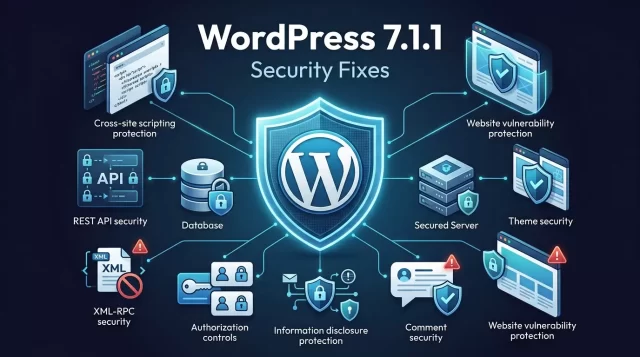
WordPress 7.1.1 addresses 11 security issues involving areas such as stored cross-site scripting, authorization checks, REST API functionality, XML-RPC, comments, theme installation, and information disclosure.
One issue involved specially crafted URLs that could automatically install and preview an inactive theme from WordPress.org. Another involved authenticated path traversal in the WP REST Templates Controller. The release also fixes issues involving private post information, draft or pending post slug disclosure, and comment reparenting.
These examples show why keeping WordPress Core updated remains an important part of website security.
WordPress 7.1.1 Security Fixes Explained
The official release lists 11 security fixes. Here are the major categories in simpler terms.
1. Stored Cross-Site Scripting
WordPress 7.1.1 fixes a stored XSS issue involving wpautop() that could allow an unauthenticated visitor to inject script under specific conditions related to comment approval.
The release also addresses stored XSS in some themes that support custom header images.
Cross-site scripting can create security problems because malicious scripts may execute when users interact with affected content.
2. Theme Installation Through Crafted URLs
One of the notable fixes addresses specially crafted URLs that could automatically install and preview an inactive theme from WordPress.org.
This does not mean every WordPress site was automatically compromised. However, it demonstrates how unexpected functionality can become a security concern when an attacker can trigger actions through specially constructed requests.
Website administrators should therefore avoid delaying security updates without a good reason.
3. REST API Path Traversal
The update also fixes an authenticated path traversal issue in the WP REST Templates Controller.
REST API components allow WordPress and other applications to communicate with website data and functionality. Security controls around these endpoints are therefore important, particularly on sites that use integrations, custom applications, or advanced WordPress development.
4. XML-RPC Security Fix
WordPress 7.1.1 addresses an XML-RPC issue involving customize_changeset posts and checks related to edit_css.
XML-RPC has been used by WordPress for remote communication and publishing functionality for many years. Website administrators should make sure their plugins and security configurations do not introduce additional risks around XML-RPC.
5. Authorization and Information Disclosure Issues
Several fixes improve authorization checks and prevent information from being exposed under certain circumstances.
The release includes fixes for:
-
Private parent-post title disclosure
-
Draft or pending post slug disclosure
-
Contributor-level arbitrary post overwrite
-
Unauthorized comment and note reparenting
-
Network activation of an installed network-only plugin
These issues show that WordPress security is not only about preventing code execution. Proper access control and information protection are equally important.
WordPress 7.1.1 Bug Fixes
Security is the main reason to install this update, but WordPress 7.1.1 also contains a substantial number of maintenance fixes.
The official WordPress release reports:
-
17 Core bug fixes
-
19 Block Editor bug fixes
-
11 security fixes
Together, these changes improve the reliability of the WordPress platform without turning the release into a major feature update.
The Block Editor fixes are particularly relevant for users who build pages and posts with Gutenberg-based editing features.
How to Update to WordPress 7.1.1
Updating to WordPress 7.1.1 is straightforward for most websites.
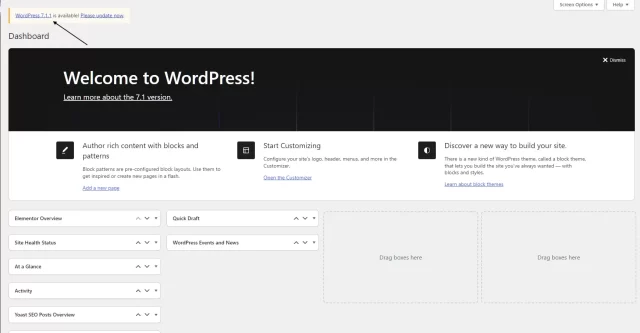
Method 1: Update From the WordPress Dashboard
Log in to your WordPress admin panel and follow these steps:
-
Open Dashboard.
-
Go to Updates.
-
Look for the available WordPress update.
-
Click Update Now.
-
Wait for the update process to finish.
-
Check your website after the update.
WordPress officially recommends updating through the Dashboard or downloading the release from WordPress.org. Websites that support automatic background updates may receive the update automatically.
Method 2: Manual WordPress Update
Advanced users can also download WordPress 7.1.1 from the official WordPress release archive and perform a manual update.
However, manual updates require more technical care. Before replacing WordPress Core files, create a complete backup and make sure you have a reliable recovery method.
Should You Update Your Website to WordPress 7.1.1?
For websites running an older version in the 7.1 series, the WordPress 7.1.1 update is an important maintenance step because it includes security fixes.
WordPress itself recommends updating sites immediately because this is a security release.
Before updating a production website, especially an ecommerce or business website, you should still follow a sensible backup and testing process.
A good workflow is:
Backup → Update → Test → Monitor
This approach reduces the chance that a compatibility problem with a plugin or theme will cause unexpected downtime.
What to Check Before Installing WordPress 7.1.1
Although WordPress updates are normally simple, websites with many plugins, custom themes, or custom code deserve extra attention.
Before updating:
-
Create a full website backup.
-
Back up your database.
-
Confirm that your hosting account has enough storage.
-
Check whether your important plugins support your current WordPress version.
-
Make sure you can access your hosting control panel.
-
If possible, test the update on a staging website first.
You should pay particular attention to websites that generate revenue, collect customer information, or depend on complex integrations.
What to Check After the WordPress Update
After installing WordPress 7.1.1, do not simply close the dashboard and assume everything works.
Visit your website and test the important functions.
For a normal blog, check:
-
Homepage
-
Blog posts
-
Categories
-
Navigation menus
-
Contact forms
-
Search
-
Comments
-
Images
For an ecommerce website, also check:
-
Product pages
-
Shopping cart
-
Checkout
-
Payment methods
-
Customer login
-
Order emails
-
Coupons
-
Account pages
If your website uses a custom theme or plugin, test its most important features as well.
Advantages of WordPress 7.1.1
The WordPress 7.1.1 update offers several practical benefits.
Better Security
The release fixes 11 security issues, making security the primary reason to install it.
Improved Stability
Core and Block Editor bug fixes can help improve the reliability of existing WordPress functionality.
Safer Website Maintenance
Regular WordPress Core updates reduce the amount of time a website spends running an outdated version with known security issues.
No Major Redesign Required
WordPress 7.1.1 is a maintenance release, so website owners are not installing a completely new major version with a large set of user-facing changes.
Possible Risks of Updating WordPress
No software update is completely risk-free.
The most common concern for website owners is compatibility between WordPress Core and third-party plugins or themes.
A plugin may depend on specific WordPress behavior, while a custom theme may contain code that has not been tested against the latest maintenance release.
This does not mean you should avoid security updates. Instead, use backups and staging environments where possible.
For a high-traffic website, test the update before applying it to the production environment.
Common WordPress Update Mistakes
Website owners often make a few avoidable mistakes when installing WordPress updates.
Updating Without a Backup
A backup gives you a recovery option if something goes wrong.
Ignoring Plugins and Themes
WordPress Core is only one part of a WordPress website. Plugins and themes also need regular maintenance.
Updating Everything at Once
Updating WordPress, dozens of plugins, and a theme simultaneously can make troubleshooting harder.
When possible, change fewer variables at a time.
Not Testing the Website
A successful update does not automatically mean every website feature works correctly.
Always test important pages and functions after the update.
Staying on an Old Version for Too Long
WordPress provides security fixes to supported branches, but the official release announcement reminds users that only the most recent version is actively supported. Security fixes may also be backported to eligible older branches when necessary.
WordPress 7.1.1 and Older WordPress Versions
The WordPress documentation notes that several older branches also received security fixes associated with this release. For example, WordPress 5.3, 5.2, 5.1, 5.0, 4.9, 4.8, and 4.7 each have corresponding security releases. WordPress 4.6 and earlier no longer receive security updates.
However, website owners should not interpret the existence of backported fixes as a reason to remain on an outdated WordPress branch indefinitely.
Keeping WordPress Core, themes, plugins, PHP, and hosting infrastructure maintained creates a stronger overall security posture.
WordPress 7.1.1 vs WordPress 7.1
The difference is simple.
WordPress 7.1 introduced the major release experience and new functionality.
WordPress 7.1.1 focuses on maintenance and security.
That means users should not expect WordPress 7.1.1 to deliver a completely new dashboard or a large collection of headline features.
Instead, the value of this release comes from fixing problems in the existing platform.
WordPress 7.1.1 Update Best Practices
If you manage multiple WordPress websites, consider making updates part of a regular maintenance routine.
A practical checklist looks like this:
-
Monitor WordPress Core releases.
-
Keep plugins updated.
-
Keep themes updated.
-
Use reputable security tools.
-
Maintain automated backups.
-
Test important updates on staging when possible.
-
Remove unused plugins and themes.
-
Use strong administrator passwords.
-
Enable appropriate user permissions.
-
Monitor website errors after major maintenance.
Security should work as an ongoing process rather than a one-time task.
What Comes After WordPress 7.1.1?
WordPress 7.1.1 is a short-cycle release. According to the official announcement, the next major release is WordPress 7.2, which is currently planned for December 2026.
The exact features and final release details can change as development continues, so website owners should rely on official WordPress announcements when the next major release approaches.
For now, the priority for users running WordPress 7.1 is to keep their installations updated with the latest maintenance and security release.
Final Thoughts
The WordPress 7.1.1 update is primarily about security, maintenance, and stability rather than new features. It fixes 11 security issues and includes dozens of fixes across WordPress Core and the Block Editor.
For website owners, the key takeaway is straightforward: keep WordPress Core updated, maintain reliable backups, and test important website functions after an update.
If your website is running WordPress 7.1, checking the Dashboard’s Updates section is a sensible next step. The official WordPress team recommends installing 7.1.1 immediately because of the security fixes included in the release.
Official source: WordPress.org release announcement and WordPress 7.1.1 documentation.
Frequently Asked Questions
Is WordPress 7.1.1 a major release?
Not a major release.
When was WordPress 7.1.1 released?
WordPress 7.1.1 was released on September 17, 2026.
How many security issues does WordPress 7.1.1 fix?
The official WordPress announcement lists 11 security fixes in WordPress 7.1.1.
Should I update my WordPress website?
WordPress recommends that website owners update immediately because WordPress 7.1.1 is a security release. Before updating an important production website, create a backup and test the site where practical.
Where can I download WordPress 7.1.1?
You can download WordPress 7.1.1 from the official WordPress.org release resources. The WordPress release archive lists 7.1.1 as the latest release in the 7.1 branch.